I recently signed up for Amazon Prime. I no longer subscribe to cable or satellite TV, so I was primarily interested in the Amazon Prime Video service. I have a Sony NSZ-GS7 Google TV box and a Sony SMP-N100 streaming box which can play video from Amazon. Google TV box is what is connected to my main home theater. Sony SMP-N100 is used for casual watching in family room. I use a Marantz SR6007 receiver as pre-processor and THX Ultra certified Denon AVR-4800 as amplifier. I have a 7.1 setup with KEF speakers primarily, except for Polk Audio bipole/dipole for surround back and Klipsch subwoofer. The gist of it is sound quality is as important to me as the video quality.
I fired up Google TV and started playing the movie "Skyfall". I got 1080p picture which is great but the sound was plain stereo! I double checked all cables, connections and settings but no 5.1 sound. I get 5.1 sound from Netflix on the same google TV just fine. I called Amazon and Sony and they both pointed fingers at each other. Since I was getting nowhere, I decided to move the Sony SMP-N100 box to the home theater and simply swapped google TV with this box. I fired up the same movie "Skyfall" again and voila, there was 5.1 sound. Looks like the Amazon app for google TV is picking the wrong audio stream. I called Amazon again and their response was pretty much this is how it is. So the Amazon google TV app has been handicapped in audio department for no good reason. What gives????
Wednesday, January 22, 2014

Thursday, January 2, 2014
My experiment to document vampire loss on Tesa Model S60
I recently went on a vacation for almost two weeks. Since I was going to leave my Model S60 in the garage, I decided to take advantage of this opportunity to document vampire loss while parked in unheated insulated garage. Here is what I did:

Battery charge level went down from 90% to 71% in 297 hours which translates to 1.5% per day. Range loss is less reliable data since it is subject to other variables besides just the battery charge level. Nevertheless rate of loss for rated range was 4.1 miles/day and for ideal miles was 4.6 miles/day. Over the entire 12 days car did not draw any power from the charging outlet.
- Charge to 90%.
- Leave car plugged in and reduce charge limit to 70%. This way car would not do its normal topping off every 48 hours unless battery level drops below 70%.
- Run a script every 12 hours to get the battery level, rated and ideal miles using REST API. This, of course, did cause the car to wake up twice a day.
- I have CT sensor on the charging outlet and data from the sensor is recorded continuously, so I would know if car drew any power from the outlet.

Battery charge level went down from 90% to 71% in 297 hours which translates to 1.5% per day. Range loss is less reliable data since it is subject to other variables besides just the battery charge level. Nevertheless rate of loss for rated range was 4.1 miles/day and for ideal miles was 4.6 miles/day. Over the entire 12 days car did not draw any power from the charging outlet.
Sunday, December 8, 2013
Vampire loss on Tesla S60 finally resolved
My Tesla Model S 60 kWh had been running software version 4.6 over the summer and I was seeing a vampire loss of about 7-8 miles every day. As winter started, vampire loss jumped to 15-17 miles per day. I had been waiting eagerly for version 5.x software to reduce vampire loss. I was finally upgraded to 5.6 and a week later to 5.8. My vampire loss was still in 14-16 miles per day range even though I had enabled energy saving on the display control screen:

I rebooted both the MCU (main screen) and instrument panel with no effect on vampire loss. I then tried another trick:
From my point of view, toggling energy saving feature and rebooting in between seems to have solved the vampire loss problem on my S60.
Download script to get data using REST API here. This script works on a Linux machine from command line and is based upon a similar script written by David Mosberger.
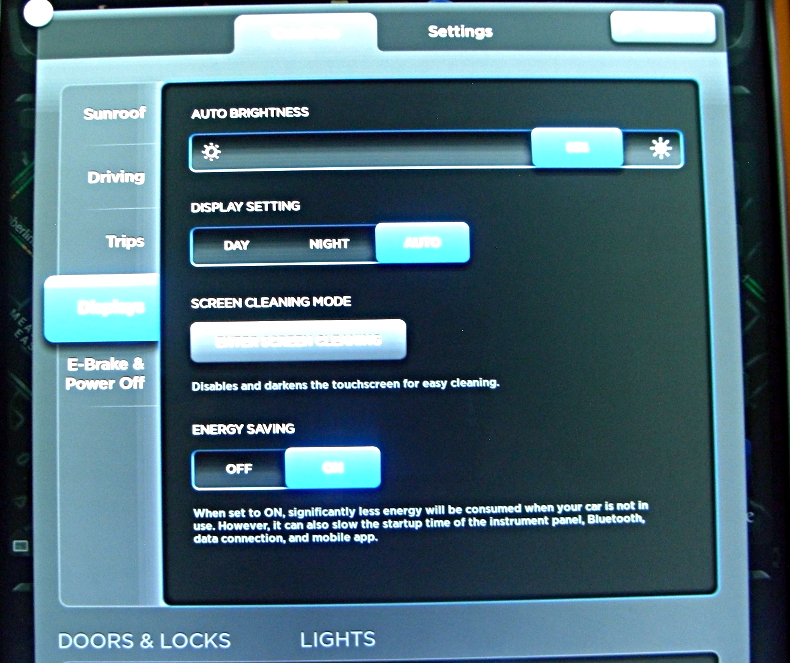
I rebooted both the MCU (main screen) and instrument panel with no effect on vampire loss. I then tried another trick:
- Turn energy saving off. Reboot MCU by holding down both scroll wheels on the steering.
- After MCU comes back up, turn energy saving back on and reboot MCU again.
Current time: Fri Dec 6 12:04:37 2013This shows my car lost about 8 miles of range and 3% of battery charge over ~44 hours. That is significantly less than what I had been seeing. 4 miles per day is reasonable vampire loss considering how cold the temperatures have been. Range estimate takes temperature into account. On the other hand, looking at just the battery level, it lost only 3% over 44 hours which is in line with what I have seen with rechargeable batteries in various other devices.
Outside Temp: 31.1 F -0.5 C
Inside Temp: 35.6 F 2.0 C
Range: 149.47 Miles
Battery: 83.0 %
Current time: Fri Dec 6 20:11:04 2013
Outside Temp: 36.5 F 2.5 C
Inside Temp: 34.7 F 1.5 C
Range: 148.77 Miles
Battery: 83.0 %
Current time: Sat Dec 7 08:54:21 2013
Outside Temp: 32.0 F 0.0 C
Inside Temp: 31.1 F -0.5 C
Range: 146.67 Miles
Battery: 82.0 %
Current time: Sat Dec 7 17:08:20 2013
Outside Temp: 34.7 F 1.5 C
Inside Temp: 32.9 F 0.5 C
Range: 143.51 Miles
Battery: 81.0 %
Current time: Sat Dec 7 18:35:54 2013
Outside Temp: 34.7 F 1.5 C
Inside Temp: 34.7 F 1.5 C
Range: 142.81 Miles
Battery: 81.0 %
Current time: Sun Dec 8 07:52:36 2013
Outside Temp: 33.8 F 1.0 C
Inside Temp: 34.7 F 1.5 C
Range: 141.4 Miles
Battery: 80.0 %
From my point of view, toggling energy saving feature and rebooting in between seems to have solved the vampire loss problem on my S60.
Download script to get data using REST API here. This script works on a Linux machine from command line and is based upon a similar script written by David Mosberger.
Thursday, November 14, 2013
Ubuntu 13.10 problems with Cisco AnyConnect VPN
When I upgraded from Ubuntu 12.10 to 13.10, my VPN to Cisco AnyConnect stopped working. I use NetworkManager to initiate VPN connection. VPN connection would fail multiple times before connecting finally. Logs showed openconnect process simply exits with error code 1. Initially I thought the problem was with TLS support in the libraries since openconnect was also logging TLS failures in the log. So I replaced /usr/sbin/openconnect with a script that would invoke real openconnect binary with --no-dtls option but that did not help. I tried a workaround based upon a suggestion from a colleague and that worked. So here is the workaround:
Workaround
Initiate VPN connection from Network Manager. When the "Connect to VPN...." window comes up:

Double click on the connect button, instead of clicking it just once. This causes two instances of openconnect to be launched. Somehow at least one of them seems to not die. Now click on Login button as usual after it has established connection with the VPN gateway server. This also creates two VPN network interfaces but you can ignore that and look at the active connection in ifconfig -a output after VPN connection is established. If you have scripts that you run after VPN connection is established that do anything with the VPN network interface, you will need to adjust it since vpn0 may not be the active interface any more.
I have not traced openconnect process yet to see where it dies, but this workaround works reliably for now.
Workaround
Initiate VPN connection from Network Manager. When the "Connect to VPN...." window comes up:

Double click on the connect button, instead of clicking it just once. This causes two instances of openconnect to be launched. Somehow at least one of them seems to not die. Now click on Login button as usual after it has established connection with the VPN gateway server. This also creates two VPN network interfaces but you can ignore that and look at the active connection in ifconfig -a output after VPN connection is established. If you have scripts that you run after VPN connection is established that do anything with the VPN network interface, you will need to adjust it since vpn0 may not be the active interface any more.
I have not traced openconnect process yet to see where it dies, but this workaround works reliably for now.
Wednesday, November 13, 2013
Tesla Model S software version 5.6 update (Update: now 5.8)
Tesla service updated my Model S software from 4.5 to 5.6. This has been a pleasant update. Some of the changes I really like are:
- Automatic display brightness adjustment at dusk and dawn: I have my display mode set to auto switch between day and night modes. I keep my display at 50% brightness in day mode and 5% brightness in night mode. Prior to 5.6, at dusk and dawn the display will switch to night mode and 5% brightness when there was still quite a bit of light. That made 5% brightness too dark and not quite readable. This forced me to tweak the brightness level a few times until sun rose or set fully. With version 5.6, display brightness ramps up/down from one mode to the other at dusk and dawn. This keeps the display from being too dark or too bright at these times and it has been a pleasure to see the display at right brightness at all times without having to fiddle with controls. Great job on this feature from Tesla!
- Status line on instrument panel: Status line at the bottom of instrument panel used small font and the background made it even a little harder to read it at quick glance. With 5.6, background has been improved and fonts are bigger. It is a whole lot easier to read now -

- FM Radio: FM radio screen has changed slightly. There is a button near the top to enable/disable HD radio. Fonts are thinner and sharper especially for the preset buttons. I like the minor enhancement overall -

One of the major features of 5.6 was low power consumption mode when not driving, aka sleep mode. Unfortunately I have not yet seen significant benefit from this yet. Vampire loss seems to have gone down just a bit but not enough. On a cold night like last night when temperature dipped to 24 deg F (my car is parked inside an insulated but not heated garage overnight), I still lost 7 rated miles (or 8 ideal miles) overnight over a period of 11 hours. Car was plugged in the whole night.
Update (Nov 18, 2013): I had contacted Tesla about the vampire loss. They told me it should get better with 5.8. I got updated to 5.8 over the weekend. I checked overnight again. This time I lost 4 rated miles (5 ideal miles) overnight over 11 hours. So it is better, but not as good as 1-2 miles loss over 24 hours others had reported with 5.6.
Subscribe to:
Posts (Atom)